VA Tips: How to Create an Asset in Canva

Canva has blown up as one of the top graphic design tools in recent years, and it’s no wonder why. With its intuitive drag-and-drop interface, everyone from your nine-year-old cousin to your 70-year-old grandma can easily create an asset on Canva.
In the marketing world, Canva has become an indispensable tool for graphic designers, web designers, social media managers, and inbound marketers, replacing pricier and more complex design tools. With Canva, it’s so much easier to create and download designs of any kind. Canva is even making their video tools more robust, so you can design social media video content faster and more easily.
If you’re new to Canva or if you haven’t been using it yet, read on and discover how easy it is to create an asset using the online design platform. If you’re already a regular Canva user, you might even pick up a few tips and tricks to get your design flow running more smoothly.
What is Canva?
Canva is a powerful design tool that allows you to create visuals for anything from social media posts to business presentations. It allows users who have little-to-no graphic design skills to produce stunning designs.
Using Canva is free, and it isn’t just limited to creating social media posts. You can create business cards, flyers, presentation graphics, invitations, brochures, posters, t-shirts, photo collages, and lots more with its drag-and-drop interface.
One of its best features is the extensive library filled with pre-made assets, overlays, and shapes that can be used in layouts. Using assets from the library is as simple as clicking a button.
Keeping your branding consistent is important. For Canva Pro users, you can even set up a brand kit for your company complete with brand fonts, colors, and logos. This makes it easier for designers to access key branding elements and keep their brand consistent throughout their designs.
Why Use Canva?
Canva has revolutionized the way that people create visuals. This graphic design tool is perfect for beginners who have almost no design skills, marketers who need to produce fast, visually appealing content, and businesses that don’t have a big budget to spend on graphic designers.
Another reason you might be thinking about using Canva is if your marketing team is struggling with how to maintain the look and feel of your brand across many different types of marketing channels. Canva helps you do this easily. Creating custom visuals for different channels means that your social media posts will match what you’ve created, whether it’s an ad or a blog post.
For a business seeking an integrated tool to keep things as easy as possible, Canva can automatically upload designs to social media as well. You just have to connect your social media accounts to it so you can publish and schedule posts as you design them.
So, what can you design with Canva? Here are just a few of the many ways you can use this tool for your business.
- Custom prints, cards, invitations
- Social media posts, banners, social media video marketing posts
- Infographics and eBooks
- Blog headers, thumbnails, and other blog assets
- Business presentations, letterheads, and other documents
- Flyers, brochures, and other types of marketing collateral
Also, Canva is available on the App Store and Play Store, so you can use it on your smartphone or tablet and create designs on the go.
Canva Free vs. Canva Pro
Another awesome thing about Canva? You can use most of its tools for free! The free version of Canva allows you to create a wide range of designs and pre-made templates already. It’s good enough for small teams to create stunning designs and videos for their social media posts, infographics and eBooks for their blogs, or presentation graphics.
But if you need more choices and features, paying the monthly fee for a Pro subscription will put thousands of extra photos, graphics, stock photos, videos, shapes, templates, and charts at your fingertips. You can also save your designs as a PDF or PNG file.
One of the best features that you can get on the Pro version, however, is the quick resize option. This allows you to adapt your design to various sizes and formats (e.g. from an Instagram post to an Instagram reel size) with just a click of a button and a couple of tweaks to the resized design.
Another useful feature that you only get on Pro, is the Brand Kit feature. We already touched on this above, but it’s a nifty feature that allows you to store all relevant elements within a Brand Kit that you can easily access anytime.
Lastly, the Background Remover feature on Pro is another fan-favorite feature. This allows you to cut out the background on an image, say your selfie, so you can use your photo on a different background. Very handy, right?
To help you assess the free and Pro versions better, here’s a quick comparison table.
| Free | Pro |
| 250,000+ templates | 610,000+ templates |
| Hundreds of thousands of photos and graphics | Millions of photos and graphics |
| – | Quick resize |
| – | Background remover |
| – | Brand kit |
You can create a wide variety of designs with Canva Free, but if you’re looking to make more sophisticated designs, Canva Pro is the way to go with its numerous features that will definitely expand your design horizon. If your company has bigger design needs, you can also get the Enterprise version which has single sign-on (SSO), 24/7 support, unlimited storage, and more.
Creating an Asset in Canva Step-by-Step:
Creating an asset takes just a few steps. Once you get started, it’ll be easy for you to put together beautiful designs.
- Go to www.canva.com.
- Sign up for an account, or log in to your account if you have already created one.
- Click on the “Create a design” button.
- Choose the type of asset you want to create (e.g. Facebook post, Instagram story, Presentation, A4 document, etc.). This will determine the size of your asset.
- Choose a template or start with a blank template.
- Choose from the vast library of elements that includes everything from photos to frames to animated graphics, and so on.
- Add any element you want on your canvas. To do this, you just need to click on the element or drag and drop it onto your canvas. You can also upload your own photos or graphics and use them as elements.
- Use the available editing tools to resize and move the elements on your canvas.
- Add overlays, shapes, or additional text for a more personalized design.
- If this is going to be a branded design, don’t forget to add your logo and update the colors of the elements to match your brand colors.
Save and/or share your design!
Tips on How to Use Canva Assets and Features
Canva has a large and growing collection of assets, making it even easier to come up with designs from scratch. You can make blog headers, social media graphics, resume layouts, certificates, posters — anything that requires an image! Here are some tips on how you can best utilize Canva for your design needs.

Don’t Overuse Fonts
Applying numerous fonts to your design makes it harder to read. It can even become an eyesore and make your campaign ineffective. Try to limit the use of different fonts. You may experiment with using two fonts that look good together, but using three or more can be too much. This will make your message confusing. You’ll also have a hard time knowing what font works and what doesn’t if you use too many fonts.
Make Custom Fonts
Make custom fonts for consistency across all of your designs. Select “Create a text style” to produce fonts that match the colors and styles you already use for your brand. The Canva library even offers font pairings that look great together. These fonts are then saved for you to use again and again!
Use Scaling to Emphasize a Word or Phrase
Don’t hesitate to scale texts. If you want to put emphasis on a phrase or a specific word, size up that phrase or word to prove your point. This makes your message more compelling.
Use Colors Consistent with Your Brand
Colors should not be taken for granted. Establish your brand colors and use them consistently in all your assets. This strengthens brand character and the “personality” of your brand. When combining colors, make sure that any text you use them on remains readable.
Click Randomize Background for Pattern Ideas
Discover color combinations and patterns by clicking “Randomize” under “Create a background.” You can even premake sets of colors and patterns that match your brand to use across all of your designs.
Use the Sizing Tool to Resize an Image
You can edit your image size by selecting the “Image Sizing Tool” under the “More tools” section on the right of the screen, then drag the sliders to resize. This will allow you to customize how big or small each element is in relation to one another.
Be Mindful of Your Alignments
Make sure that your assets are consistent aesthetically. Borders, text, objects, and lines should all be properly aligned with each other. This shows that your designs are well thought of and your brand is organized. Fortunately, Canva has a snap-to-grid feature to make alignment easier.

Erase Your Background with Just a Few Easy Steps
As mentioned above, if you have the Pro version, you can use the Background Remover for easy cutting and editing. It is very helpful for brand photos that you would like to use for blog banners and other social media graphics. Click “Background Remover” and your background will disappear — no need to use a cutting tool! Then add a branding graphic or logo to jazz up the images or give them some color.
Make Your Text Stand Out
Having a good background is as important as having text that is readable. To make it more compelling, use contrast, shading, and filters to make the text stand out so it can be easily read.
Use Copyright-Free Images
To avoid any copyright issues and plagiarism allegations, use stock photos from Canva itself or stock images from free stock photo sites like Pixabay, Pexels, and LibreShot. These websites offer vibrant photos that you can use personally or commercially without having to pay a cent and without any repercussions.
Be Original and Creative
It’s better to have your own brand assets that you can call your own. You can take pride in them because they are original creations. Let your creative juices flow and experiment on what looks good and what is effective in making an impact on the reader. If circumstances require you to think outside the box, then go for it. As long as you stick to your brand’s identity and avoid jumping on the bandwagon, then you can say your assets are distinct and special.
Explore Everything Canva Has to Offer
The design process can be complicated but not impossible. With thousands of downloadable templates and hundreds of articles aimed to help you design like a professional, being hands-on will teach you to be proficient at creating better designs.
Search for pictures and templates easily using native search and curate the ones you’re interested in. Choose your design elements: fonts, colors, stock photos, and symbols to make an effective design element. With Canva, you will learn to make a design that tells a story.
Once virtual assistants follow these steps to help their clients promote brand awareness, they can expect more traffic and better results. It’s important for a virtual employee to know the ins and outs in creating an effective asset in Canva. This will not only boost the effectiveness of a marketing campaign but will also boost a VA’s career in terms of creating stunning and compelling marketing materials for their respective clients.
Utilize Existing Templates to Create Unique Designs
Just because you started off with a template doesn’t mean you can’t be original! You can use existing templates on Canva and move the elements around, change their colors, and resize them to create an entirely new look for your own asset.
Using Canva for Virtual Assistant Services
Once virtual assistants follow these steps to help their clients promote brand awareness, they can expect more traffic and better results. It’s important for a virtual assistant to know the ins and outs in creating an effective asset in Canva. This will not only boost the effectiveness of a marketing campaign but will also boost a VA’s career in terms of creating stunning and compelling marketing materials for their respective clients.
If you haven’t had the chance to use Canva, try it out yourself! It’s free and easy! Don’t worry about having perfect designs every time — practice makes perfect, after all! You can always save your designs for later so you don’t have to start over.
If you want to up your graphic design game, Canva is a great tool to start with. In just a few simple steps, you can create beautiful designs that will help market your business or product. Want to use your Canva skills to get clients? Apply to 20four7VA now!
Next: VA Tips: 15+ Free (and Awesome!) Stock Photo Websites
READ MOREDo You Need to Take a Virtual Assistant Course to Become a VA?
[vc_row][vc_column][vc_column_text css=”.vc_custom_1699950492245{margin-bottom: 0px !important;}”]
Do you want to become a virtual assistant (VA)? Do you think taking virtual assistant courses is necessary? This blog post will provide:
-
- Some examples of virtual assistant business courses
-
- Background information
-
- A guide on how to choose the best virtual assistant programs
Virtual assistants (VAs) offer a wide variety of services such as data entry, customer service, tech support, virtual personal assistance, virtual administrative assistance, project management, digital marketing, and bookkeeping, among many others.
Those who are considering becoming a VA often wonder if taking a virtual assistant course is necessary. This article will answer your questions about virtual assistant courses, training, virtual certification/classes, diploma programs, and more.
![blog header with text Do You Need to Take a Virtual Assistant Course to Become a VA? [Guide]](https://imit.20four7va.com/wp-content/uploads/2021/10/blog-header-for-the-article-do-you-need-to-take-a-virtual-assistant-course-to-become-a-va-by-20four7va.com_-1024x496.jpg)
What is a virtual assistant course and what does it cover?
Virtual assistant courses are programs that have VA services as their main focus. It’s also another term for virtual training, virtual certification/classes, virtual diploma programs, and virtual workshops.
Virtual assistant classes are a great way to jumpstart your virtual assistant career. Many of these courses or training programs let you work virtually (under the guidance of a trained instructor) on real assignments from real clients. The virtual course experience is usually abbreviated for training hours, boot camp, and virtual certification classes.
Many online virtual assistant courses also provide you with contacts of potential employers looking for freelance virtual assistants. It gives VAs who want to have a work-from-home career an edge in the market because these courses offer comprehensive training on skills that your future clients will likely need.
Benefits of taking a virtual assistant course
There are many benefits of taking virtual assistant courses online. Some VAs who have taken online classes and training say that VA training programs empowered them with the necessary knowledge and prepared them to become successful VAs.
In addition, some virtual assistant courses have online discussion forums for students currently enrolled in VA courses or training programs. In these forums, potential employers can post job openings and VAs can apply for open roles.
Is taking a virtual assistant course mandatory to become a VA?
Taking a VA course is not mandatory to become a successful virtual assistant. If you already have the skills, knowledge, and experience needed, you can simply veer off the traditional career path and become a freelance virtual assistant at any time.
It’s also possible that successful virtual assistants of today who underwent VA training also learned through trial and error and improved over time. A virtual assistant training program may help you gain virtual work experience, but it is not required to become a successful VA.
Is there training required to be a VA?
Yes and no. There is no training required to have a successful VA career as long as you work hard, learn on the job, and can improve. However, specific niche industries may require VAs to take extra online courses so they are better prepared to take on the unique challenges of the field.
[activecampaign form=68]
Why do I need virtual assistant training?
Virtual assistant courses are becoming increasingly popular as VAs face new challenges every day.
A VA course will teach you marketing, legal, and business knowledge that you may need as you take on virtual assistant jobs or apply for VA positions through a virtual assistant agency.
A virtual assistant training program can also help you better understand how to be a successful online virtual assistant by learning how tasks are performed, presented, and managed.
In addition, virtual assistant training can also teach VAs necessary soft skills such as communication abilities, time management, and customer service. An online learning platform may also contain insights on how to achieve virtual assistant success, navigate client-VA relationships, handle your first client, get new clients, take phone calls, and even set up your very own home office.
What are some examples of virtual assistant courses?
Here are some virtual assistant courses that virtual assistants can take to level up your skills:
-
Google Academy Virtual Assistant Certification Training
This virtual assistant course provides VAs with training on Google products through virtual seminars and webinars. Through this virtual assistant certification training, you will learn how to use Google Workspace, Google AdWords Keyword Planner Tool, Analytics Tools, YouTube Live Chat, and Google Hangouts.
-
Fundamentals of Digital Marketing (Google)
Virtual assistant courses from Google focus on VAs taking on the role of a virtual marketing team for their companies, as they can show employers how to make use of online marketing tools such as AdWords and Analytics by increasing the company’s online presence and traffic and website conversions.
-
Google Ads Certification Training Course
Those who want to make a virtual assistant career in PR and ads will need to take this Google Ads certification training course.
-
The Power of Email Marketing (Vivial)
This course teaches VAs some basic email marketing strategies and how to use email marketing tools.
-
Introduction to Social Media Marketing (Vivial)
Virtual assistant courses on social media are helpful for those who are looking to start as an online virtual assistant for small business owners.
-
How To Work With WordPress (WP Curve)
Courses specific to WordPress can help VAs learn how to use a content management system and develop their website-building skills.
-
Google Android Development Training (Edukits)
Ever thought about developing Android apps? With this course, you can develop and design apps specifically for Android users.
-
How To Design A High Converting Landing Page (Vivial)
If you want to learn how to create landing pages that drive sales, this course is for you.
-
Google Web Developers Training Course
This training course will give you a series of online lessons that will give you the knowledge and skills needed to build websites using HTML, CSS, JavaScript, jQuery, Bootstrap, and AngularJS.
-
Digital Marketing Institute’s Training Center (DMITC)
Courses from the Virtual Assistant Development Center can help VAs learn how to use Google Sheets and Docs more effectively so they can perform their VA job better. This course also teaches VAs how to use platforms such as Zirtual and Upwork.
-
Advanced SEO Guide for Web Developers (Vivial)
This contains the best virtual assistant courses on search engine optimization as it teaches VAs how to improve website traffic, keyword research, and how best to find a company’s target market. You will also learn more about Google Search Console and web admins here.
Apart from these courses, there are plenty of online classes and training programs that can teach VAs how to handle virtual customer service and technical support jobs such as handling tickets and providing help desk services for online businesses.

How do I take virtual assistant courses training?
In order to take virtual assistant courses, you must register in online schools or companies that provide training. Consider searching through a list of the best virtual assistant courses from VA certification providers. You should always make sure to read the reviews before signing up to ensure that the virtual training program is legitimate and suited for those who want to jumpstart their VA career.
Taking courses will earn you skills and certifications that will look good on your resume. This will also attract clients as this is basically proof of your skills and knowledge of your field. Taking online business courses is an excellent training alternative for those who cannot attend workshops and classes in person.
FAQs about VAs and VA courses
As virtual assistant business courses have become more popular, people want to know what they are, whether they’re worth it, and what a VA course contains. In this short FAQ list, we’ll cover:
- What virtual assistant courses are
- Is virtual assistant training worth it?
- How virtual assistant courses work
- What online business VAs do
- How to become a VA with little investment in time or money
What are virtual assistant courses?
Virtual assistance courses are taught by specialist tutors or trainers who have experience in being VAs. They deliver live classes or virtual training sessions and can also provide one-on-one virtual assistant training.
Is virtual assistant training worth it?
The short answer is yes, virtual assistant career courses are definitely worth it. But this isn’t just because virtual assistant training companies will give you all of the information and tools you need to become a VA. It’s also because virtual assistants often learn insider tips and tricks from other VAs, virtual training courses, and forums. And, finally, online virtual assistant courses give you a great opportunity to network with VAs, clients, and business owners from all over the world.
How do virtual assistant courses work?
Virtual assistant courses basically allow you to get involved in virtual career training that will put the right tools into your toolkit. From learning social media skills to knowing how to utilize Microsoft Word to its fullest, creating a business plan to learning how to write winning proposals, virtual assistant courses give newbies all of the tools they’ll need to become a skilled VA.
What do virtual assistants do?
A virtual assistant acts as an extension of their clients, helping complete tasks and projects so the client doesn’t have to spend all their time doing busywork. These tasks may include handling email correspondence, updating a website or social media page, creating professional documents or marketing materials, scheduling meetings and appointments for clients, running errands, and helping keep track of projects.
How to become a VA with little investment in time or money
Becoming a virtual assistant takes dedication and effort, which might translate to a lot of time and money for some people. Luckily, there are virtual assistant courses you can take at your own pace that will teach you the skills and tools needed to become a VA. These courses are relatively inexpensive compared to spending months of one-on-one virtual training sessions. They’re also more convenient as these courses can be taken from home or work, and sometimes, you may have lifetime access to this information.

Should you take a virtual assistant course?
Becoming a virtual assistant is a great idea for people who want to work from home and set their own work schedules. The virtual assistant business course that you take will educate you on the most effective ways to find clients, negotiate your rates, create professional proposals, and use virtual office tools to collaborate with clients.
While virtual assistant training courses can be expensive, some employers prefer VAs who have completed training and are willing to pay higher rates for those with certification.
However, not all virtual assistant courses are created equal. Some VA courses are simply starter kits that don’t teach you much more than online tools you may already be using and communication or collaboration skills you already have. It’s important to do your research before deciding to pay for a virtual assistant course.
The bottom line
Do you need to take virtual assistant training courses? The answer is both yes and no. VA courses are recommended because you will learn relevant skills through training programs designed to help virtual office assistants be better equipped to handle administrative tasks with the highest virtual office standards. However, you can also learn virtual assistant skills on your own by using free tutorials, taking free classes (some offer certifications!), and reading “become a virtual assistant” articles written on reputable VA websites.
Now that you know what a virtual assistant is and how to become one, take some time to improve your skills (or learn new ones) so you can be a more well-rounded (and more in-demand!) VA. When you’re ready, take a stab at applying for your first virtual assistant job.
Next: Become a 20four7VA Virtual Assistant
[/vc_column_text][/vc_column][/vc_row] READ MORE
35+ Free Online Business Courses Worth Taking in 2023

As a home-based virtual assistant (VA), you might be thinking that there’s no reason for you to take any online business courses (free or not) to do your job. After all, taking those courses should be your clients’ responsibility because they are the ones who actually run a business, right?
WRONG.
In order to provide the best virtual assistant services, you have to know the basics of online business as well. Taking free online courses can help you with this. Build yourself a reputation as a VA who knows and understands their client’s needs and their business. By doing so, you will gain a competitive advantage, and there will be more opportunities for you to make money from home and advance your career path.
While it is an advantage to know a certain area or have special skills that are important to a business’s success, you don’t usually need to have a formal degree required to apply for virtual assistant positions. However, taking business courses can make the difference between getting hired and not. Having relevant additional qualifications will certainly interest a potential employer or hiring manager.
It’s never too early or too late to start learning from free online courses. If you are just starting out as a virtual assistant, courses can help you better understand your clients’ business. Before you know it, you will be able to provide more value in the services you offer them because you have an inside scoop on what businesses need.
You can even take business management courses as a virtual assistant to improve your skills online or through a business school. This is especially important if you want to work for yourself and start your own business one day, which many people dream of doing for years!
Several online websites offer free business courses, such as Coursera, Udemy, Simplilearn, eLearning for business strategy online, course sites that are not technical schools or online universities.
However, you should take into consideration when looking into new courses to take. If you want to learn business administration, financial accounting, supply chain management, operations management, or project management, it is best to go for institutions with accredited certificate programs.
For example, suppose you want to learn how to manage a business. In that case, courses offered by universities like Harvard, Stanford, Massachusetts Institute, or other online technical universities are probably the best way to go.
Virtual assistants will always be in demand because the challenges of running an online business will never end. Taking business management courses or business administration programs can open more doors. If you plan to enroll in a business management course, you don’t have to worry about not being able to attend when you’re busy because you can study for as little as less than an hour a day or on your own time.
With this in mind, it is safe to say that taking this extra step is good for your career because it can help you become a better virtual assistant. It can also help you land more clients for your business.

Benefits of Continuous Learning
Before we start looking at some business administration courses and business management programs that you should take, it’s important to understand why learning things like coding or writing is so valuable. One of the reasons is that many of the available jobs now didn’t even exist before 2012. Job trends come and go very quickly over the course of just 5-10 years.
For example, in 2011, no one could have predicted that the number of people working as virtual assistants or social media managers would rise by 595% by 2021. But it did because these are jobs created out of the need for businesses to stay relevant in this new technology-driven era.
As a business owner, online programs maybe your best option for continuing education. The internet is an inexhaustible source of information, and it can give you the online business course you need at any time convenient for you and at your own pace.
Free Online Business Courses to Take in 2023
Your online presence is like an online shop – without advertisements and proper marketing, no one will come. But online courses like business administration aren’t cheap, so the question is – where do virtual assistants looking for free business courses go? We’ve compiled a helpful list of courses that will give business professionals a head start starting in 2023.
Web Development: HTML, CSS, JavaScript
HTML, CSS, and JavaScript are the building blocks of online content. Learning how to use them if you want to create online content is important for virtual assistants looking for online business courses free because it will allow you to work on your website anytime, anywhere.
Intro to HTML – One of the most in-demand skills in the digital world is web development. HTML, in particular, is a language that will be helpful for you to learn because working online will have you encountering the language at some point or another.
Intro to CSS – Learn the basics of CSS. This course is good for any beginner or those who need a refresher.
Intro to JavaScript – This course lets you learn the basics of JavaScript, implement script tags, and create basic JavaScript experiences. It is useful for web development and goes well with learning HTML and CSS.
Dynamic HTML Application (Interactive and Animated Websites) – Learn how to create dynamic web pages. Using the combination of HTML, CSS, and JavaScript, this course will teach you how to animate text and images, create rollover buttons, capture user input through forms, and many more.
Beginner Web Developer Course – Beginners interested in furthering their knowledge and usage of HTML, CSS, and JavaScript will find this course useful. It will allow you to practice front-end development coding for both web and mobile.

Free Online Programming Courses
Need to add new skills to make your resume stand out even more to potential employers? Learn to program for free! If you have little to no knowledge about programming or computer science, you can pick up new coding skills with the free online courses below for frontend or backend development and even for mobile.
Diploma in C Programming – Most programmers have C as their foundation. This comprehensive and free C programming course (with a diploma!) will teach you all you need to know about the basic and advanced programming concepts of the C language.
Java Programming for Beginners – Anyone who wants to learn how to develop Android apps needs to take this introductory Java programming course. This is intended for complete beginners and students in Java syntax and backend web development.
Introduction to Python Interactive Programming – Interested to learn how to build interactive but simple games like Blackjack, Asteroids, and Pong? Take this course and discover the fascinating computer science behind it.
Intro to C++ – C++ is a programming language primarily used in gaming, embedded programming, and server-side applications, to name a few. Learn the introductory but fundamental concepts in C++ with this course.
Introduction to PHP – Most interactive and dynamic web pages run on PHP, and it is considered one of the most popular programming languages globally. This is a hands-on course that will teach you computer science and its fundamental programming concepts.

The Business of Digital Marketing
Online marketing is on the rise in the business world, and it is a must for virtual assistants in this niche to be well-versed in how online advertising works. Hone new skills, develop your marketing knowledge, be up to date on business certificate programs and enroll today!
Intro to Google Ads – You can find everything you need to know about Google in this course. Learn how to increase sales using Adwords, create optimized Ads, and even create video Ads.
Google Ads Step-by-Step Training Guide – Need a quick course on Google Ads because you have a tight schedule? Worry not! This program will let you easily create, develop, and optimize your campaigns effectively and efficiently.
Intro to Facebook Ads – Learn all you need to know about Facebook ads straight from the experts. With this training course, you will learn about generating leads, creating strategies, designing ad campaigns, and monitoring them.
YouTube Video Marketing Intro – This program contains a solid intro on YouTube video marketing. From optimizing the channel for organic growth to keyword research and more.
YouTube Marketing: The Five Essential Steps – Learn how to grow YouTube traffic and revenue in five steps. This course will provide insights into the platform’s algorithm for views and better engagement.
Instagram Marketing Course for Beginners – Learn the best practices for marketing on Instagram through this course. Know the secrets of the posting strategies for Stories, Live videos, Highlights, and many more!
Google’s Free Digital Marketing Course – Learn and master the basics of digital marketing at your own pace. There is unlimited access to all modules, and this course is suitable for beginners and advanced students.
Intro to Social Media Analytics – As a social media VA, it helps not only to know how to create content for your client’s social media profiles but also how to measure their success rate. This course will teach you different methods of measuring the performance of your previous posts to help you create more engaging content for future posts.
The Science of Everyday Thinking – Understanding people and your potential market is key to generating sales. This course can help you understand how people think, why they make the decisions, how they make choices in advance, and why they steer clear of other choices.

Online Business Courses for Design
Anyone can learn design (even students). Those with an eye or an interest in taking up graphic design or who want to brush up their skills more can take advantage of the free online courses provided below. You can join certificate programs to take your job application and career to the next level.
Practical Applications of Design Principles– Graphic design is more than just creating logos and illustrations. This course will teach you core graphic design principles that apply to all media in print and digital technology platforms.
Interaction Design – This course from UC San Diego will help you understand the basics of good User Experience (UX) and how to design interfaces that will help your users or site visitors explore your site more effectively. This knowledge can help you guide them through their purchase decision better.
Graphic Design Basics – Get your foundation and the basics of design when you take this course. You can gain many insights whether you are a beginner or an experienced graphic designer returning to basics.
Logo Design Fundamentals – Curious about what it takes to build a great brand logo and how to come up with original ideas every time? This course will help you with that.
Introduction to Adobe Photoshop – Adobe has its very own learning resources on its website. Take advantage of the vast categories and pick the skill level you’re comfortable with, and start learning this popular image editing technology right away.
Beginner’s Course to Adobe Illustrator – Learn the basics of using Adobe Illustrator and quickly master creating effects and patterns using its tools.

Improving Content Writing
Why should virtual assistants learn basic content writing? Content writing involves a lot of research, so you learn something new every day. There’s so much more to writing about topics. As you develop your skills as a content writer, you will learn the minute technicalities and structure of different kinds of content and how to use them effectively.
SEO for Beginners – Learn the fundamentals of search engine optimization or SEO. This program provides a short course on keyword research and on-page and off-page optimization.
Content Writing Certification – This free course covers content planning, creation, repurposing, management, promotion, and analytics. Learn about effective content management strategies and get a certificate after passing an online exam.
Intro + Insights of Copywriting – Learn important copywriting principles to generate leads and increase sales. This short but comprehensive copywriting course will help you find the right words to sell a product or service.
Improving Your Academic Writing – Learn and practice essential writing skills to take your academic essay writing career to the next level.
High-Impact Business Writing – This course includes an introduction and the basics of business writing. You will learn about various business document types and how to write effective business copies.
Email Marketing for Beginners – For those who want to venture into email marketing as a future career, you’ll learn a lot from this free and flexible course. You will know how to build marketing funnels, grow email lists, create campaigns, and more!
[activecampaign form=68]

Free Courses on Effective Communication and Self-Improvement
Freelancing as a virtual assistant means that you interact with different personalities, and it is true for any business and any career. Learning how to communicate effectively, resolve problems and conflicts, and negotiate better are next-level career game-changers.
Principles of Human Communication – Communication is one of the most important aspects of business, and this course can help you gain the upper hand in your daily conversations by understanding the principles and theories behind them.
Negotiations and Conflict Management – Negotiating and managing conflict are skills that are not only important for business but essential for your daily life as well. This course will effectively teach you to negotiate, manage workplace conflicts efficiently, and improve professional relationships.
Improving Communication Skills for Success – It is important to learn how to communicate at work and how to do it effectively. This course will help improve leadership and communication skills through the key principles of cooperation and competition.
Landing That Job Interview – Learn the secrets on how to become a remarkable job interviewee. This course contains interviewing techniques and other lessons to help you get that dream job.
Time Management Course – In 7 specific steps, learn how to manage time effectively and increase productivity by avoiding bad habits that could lead to procrastination.
Improving Social Confidence for Introverts – Remote work is already challenging but even more for introverts who lack confidence and communication skills. Learn how to socialize, communicate better, and improve self-confidence to boost your career.
Next: 8 Hard To Resist Opt-in Offer Ideas For Small Business Owners
20four7VA recognizes the challenge of effectively managing a business, and we are eager to help. We specialize in virtual human resources that we customize to specifically fit the needs of small to large enterprise business owners to scale their business without worries safely.
Ready to have access to incredible people with incredible skills in the most cost-effective way? Book a consultation call with us!

Top Virtual Assistant Tools 101 (Part 7): Cybersecurity and Data Security System Tools
Having a virtual assistant (VA) can be life-changing. But working with anyone remotely does carry some risks, especially if you don’t have data security system policies set up. For instance, data theft and business disruption caused by cyber threats can wipe out hard-won profits in an instant.
Thankfully, there are tools that can protect you from malicious code attacks, data breaches, and other threats to your business. Let’s dive into the importance of cybersecurity and data security and look at the data security technologies that make remote or hybrid work safer for everyone.
Cybersecurity and data security, defined
What is cybersecurity?
Cybersecurity is a vital component of any business, regardless if you have a co-located, distributed, hybrid, or fully remote workforce. Cybercriminals can easily breach your computer network, devices, email accounts, or social media accounts. This can lead to a loss of revenue, clients, and valuable resources, as well as information leakage. Cybersecurity encompasses all the different ways you can protect your devices and networks from digital threats such as infiltration by hackers.
What is data security?
Data stored in computers and other devices must be protected against unauthorized access, modification, or corruption while it remains at rest (stored on devices) and in transit (being sent over a network). Data security refers to the measures taken to protect company information from loss, misuse, alteration, theft, or unauthorized access when used by employees or transmitted through networks.
Whether it’s sensitive financial documents, customer records, or confidential business information, all of your data must be kept safe at all times. Sensitive data can be stolen by cybercriminals and used for various reasons, such as gaining access to bank accounts, credit card numbers, usernames, passwords, and even company positions or strategies. Data leaks or breaches could also put your enterprise at risk of getting hit with a lawsuit if customers’ private data gets out into the wild. Distributed Denial of Service (DDOS) attacks can bring down servers, and viruses have the potential to wipe out hard drives.
If you’re running a remote or hybrid team, any personal and business information you share online is vulnerable to malicious activity such as phishing attacks or man-in-the-middle attacks that could lead to identity theft, malware infections, ransomware, or worse.
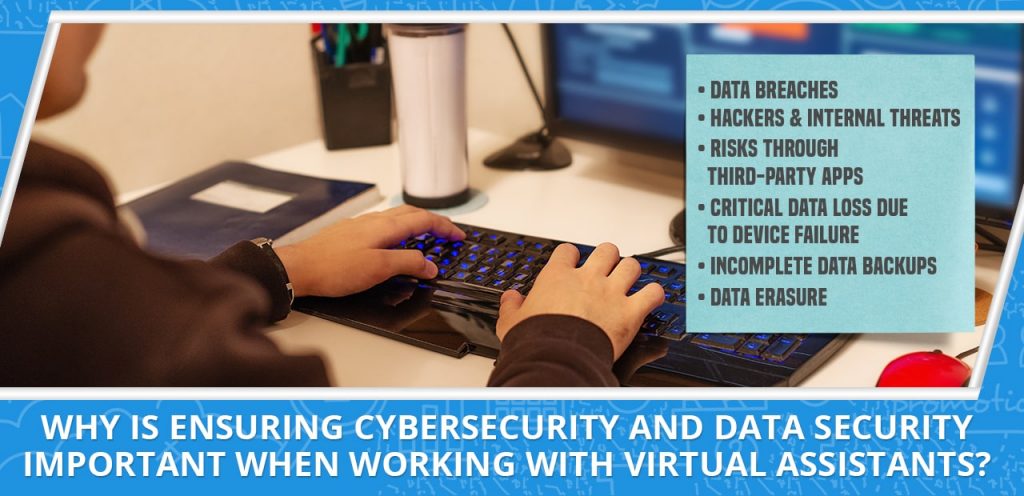
Why is ensuring cybersecurity and data security important when working with virtual assistants?
If you hire a VA, chances are they’ll be handling sensitive data for your business. They may have access to files and emails that contain customer information, financial records, personally identifiable information, or even trade secrets. Anytime your VA accesses your data from an unsecured location, such as a coffee shop’s free WiFi network, there’s a chance that hackers could intercept your communications and pose a serious threat to your company’s privacy and security.
The virtual office lifestyle offers unique opportunities for hackers to infiltrate your data and business operations. Hackers can gain access to private accounts, steal sensitive information, or enter malicious code into a work platform, causing chaos throughout your operations and potentially stealing millions in just minutes. If you work with offshore teammates, vendors, contractors, freelancers, or business associates based in another part of the world, there’s a major risk of enterprise data breaches, phishing emails, and malicious code attacks.
Here’s a breakdown of the many types of data security and cybersecurity issues a virtual assistant (or any remote worker) may experience:
-
Data breaches
Remote workers sometimes work on the go — in public places like a coffee shop, while traveling, or anywhere else they have a few minutes of downtime. This is convenient for many reasons, but it makes your business vulnerable to dangerous situations that could result in inadvertent data exposure. Devices may be stolen, someone may accidentally walk off with another person’s laptop or smartphone, or other people might recover files your remote employee forgot about after leaving their office desktop unattended for too long.
-
Hackers and internal threats
Many hackers go after businesses with weak security practices. If you’re working remotely without advanced data protection systems in place, you could be opening yourself up to potential attacks from individuals who want to steal information from your system and sell it to competitors or offer it on the black market.
To protect against this kind of security threat, look for data security system solutions that offer advanced data encryption and password protection. This way, unauthorized users can’t access your most sensitive and personal data, even if they’re working right alongside you in a virtual office environment.
-
Risks through third-party apps
Some remote workers transmit critical information over public networks; others rely on cloud storage platforms that could be vulnerable to attacks, including viruses and malware. These data storage apps may not be as secure as you think. Some hacker groups have already breached large cloud servers like Google Drive or Dropbox to steal personal data about their customers.
The risks are high when transferring data through public clouds — the iCloud celebrity photo leaks made this painfully clear. To protect against these security threats, use cybersecurity and data security technologies that connect to your online data and file storage platforms through private network connections. This way, all of your business files, financial data, and customer data are safe from thieves and malicious attackers.
-
Critical data loss due to device failure
Whether remote or not, any employee can experience data corruption or data loss caused by sudden hardware failure. Even a single mistake when backing up system information is enough to completely overwrite data or to lose everything you’ve worked so hard on. If a remote worker’s device fails or doesn’t work properly, it can be very difficult to retrieve your business data and get back to work quickly. Data security system tools protect your virtual office and allow you to recover lost files easily after a device failure.
-
Incomplete information due to manual backups
Manual data backups can be even riskier than cloud-based storage. Many people create their own strategies for backing up important files, but they don’t always complete the process successfully. Some of these issues have included critical file corruption and loss, which are especially devastating for remote workers.
-
Data erasure
Accidentally erasing files and information you need is a problem that can affect everyone, including remote workers. Even if every worker in the office takes care with their devices, they may still lose important business data through accidental deletion or device errors like hard drive corruption. Data security system tools help recover erased data and avoid exposure of critical business files. Once the files have been recovered, the software can securely erase them from your system to prevent anyone else from recovering them.
Benefits of cybersecurity and data security system solutions for remote workers
Anyone who uses the internet faces cybersecurity risks. Fortunately, there are effective tools available specifically designed to help you minimize these threats.
The benefits of data security and cybersecurity software include:
-
Peace of mind
Your business depends on maintaining its reputation and standing within your industry, which means avoiding any harmful data security issues. Cybersecurity software can help safeguard your information so you never experience a damaging breach or other loss that could hurt your brand.
-
Better privilege allocation and access management
As your business grows, you may work with more employees who need to access confidential files. Cybersecurity technology can give you greater control over what information they can access and how much they can do with it.
-
Reduced downtime
If your system fails or is damaged beyond repair, the consequences can be severe. Cybersecurity software ensures that your vital systems and information are safe from corruption or loss caused by hardware failure and other issues. This way, you’re able to avoid downtime while enhancing the quality of remote work for your employees.
-
Regulatory compliance
Some industries are required by law to encrypt their data or use other specific cybersecurity measures. However, many organizations overlook these requirements until they’re found in violation of the rules and regulations that govern them. With the right data security system software for remote workers, you can avoid this issue by ensuring your systems are compliant before you run into problems with regulators.
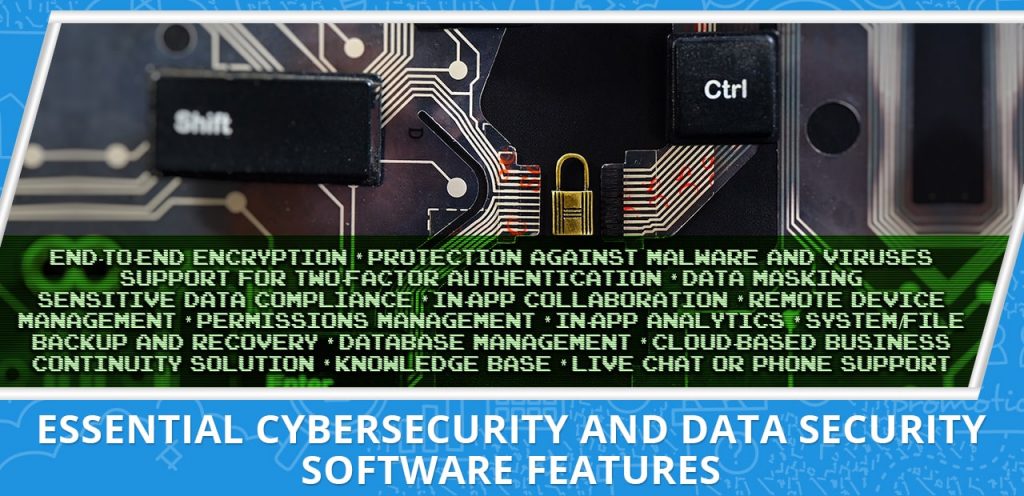
Essential cybersecurity and data security software features
The software you choose should provide advanced security features and maximize the benefits of remote work. Look for cybersecurity and data security solutions with the following features:
-
End-to-end encryption
Encryption is one of the most critical aspects of cybersecurity and data security, especially for protecting confidential files from unauthorized access or leakage. It replaces sensitive information with codes that prevent prying eyes from viewing what’s behind it, while decryption lets you access this information whenever necessary. These features are important for most businesses dealing with sensitive data, but they’re especially important if your organization deals with financial information or keeps medical records.
-
Protection against malware and viruses
Malware and viruses can steal your data or cause serious damage to your system and files. Business-class cybersecurity software should offer full protection against these threats, giving you peace of mind that your remote workers can complete their tasks safely.
-
Support for two-factor authentication
Two-factor or multi-factor authentication involves using multiple forms of identification to verify your identity. This makes it harder for unauthorized users to gain access to your data or network.
-
Data masking
Data masking prevents unauthorized users from viewing sensitive information by replacing it with something more innocuous. For example, you can use a service that replaces names or addresses in your emails with generic codes to prevent snooping or other cyber attacks.
-
Sensitive data compliance
If your business deals with sensitive data, it’s essential for the software you use to meet regulatory compliance standards that are enforced in your industry or country. Some remote computer network management solutions have features designed to ensure the secure disposal of information when employees leave their organizations, while others keep track of data transfer protocols and other measures that protect security and privacy.
-
In-app collaboration tools
Some remote access tools are designed to protect information while allowing you to collaborate with a team. These features can include multiple levels of user access and the ability to manage who has which permissions for various types of files, directories, or other accounts.
-
Remote device management tools
Many software systems allow you to manage the hardware used by remote workers. This includes features that control what software is installed on each device, force updates or patches to be applied and keep tabs on which devices are active at any given time.
-
Ability to change permissions for individual accounts
It’s critical to have the ability to restrict access and change permissions on a per-user basis so you can keep tabs on who has what kind of access at any given time. Similarly, it’s helpful if you can control how people use this access by setting up expiration dates or other limits.
-
In-app analytics tools
It’s important to be able to track how employees are using your systems, which includes both basic usage statistics and more in-depth information on each user’s actions. This enables you to identify security risks, improve team efficiency and adjust configurations as necessary.
-
Ability to backup and restore files
Even if you use the best security software, you may still have to deal with data breaches in the event that a storage device is lost or stolen. Data backup features let you recover everything from emails to employee profiles without having to reenter information, while system restoration can get your entire server up and running quickly in case of hardware failure.
-
Database management platforms
These systems can be used to manage storage devices, including both the hardware used to store files and the data itself. This includes features that allow you to monitor how much space is used on a device, which users are taking up the most space and how long each file is being stored. Many database management platforms also include backup and restoration features for safeguarding your data in case of an emergency.
-
Cloud-based business continuity solutions
Cybersecurity threats aren’t always a one-time, complete incident. They can be ongoing, which means you need to have in place an offsite backup system that includes remote servers and other cloud-based resources. This enables you to recover critical business information quickly should your local system become inaccessible due to cyberattacks or data corruption.
-
Knowledge base
The right cybersecurity solutions provide an online knowledge base where you can look up specific issues or threats to ensure you’re addressing them in the right way.
-
Live chat or phone support
Cybersecurity and data security systems are highly technical software tools, so it’s important for the companies that sell them to offer some type of customer service. Whether it uses online chat features or is available by phone at any time, this support helps you ensure that your team will receive the help they need when they need it.
Top cybersecurity and data security system tools for remote teams
There’s a staggering array of products available to protect you and your company from cybersecurity and data security threats. Many of these tools work directly with your existing storage devices, while others can monitor the usage of mobile devices or manage database access.
These are some of our picks for cybersecurity and data protection tools:
1. McAfee Data Center Security Suite
This platform safeguards files from unauthorized access and malicious tampering, gives you real-time visibility into database activity, and helps you create a custom security policy for your system. Data Center Security Suite includes McAfee’s Vulnerability Manager for Databases, Database Activity Monitoring, and Virtual Patching for Databases.
2. Symantec Endpoint Protection
This tool gives you comprehensive control over endpoint devices, including everything from servers to mobile devices. It also gives you continuous security monitoring, proactive threat management, and extensive reporting capabilities. Symantec Endpoint Protection includes intrusion prevention, anti-malware, and firewall features.
3. Trend Micro Deep Security
In addition to centrally managing and monitoring your platforms, apps, and data, this security suite can also detect new threats across the entire network. It provides a unified view of everything that’s going on in your network, including alerts for suspicious activity that could indicate unauthorized access to sensitive files. Deep Security also has features designed specifically to help you maintain regulatory and compliance requirements.
[activecampaign form=66]
4. Incydr
This platform is one of the fastest and most comprehensive tools for monitoring all file activity and mitigating exfiltration risks and data exposure. Incydr is particularly useful for businesses with remote workers and those who want to protect their data from high-risk employees (e.g., “flight risk” employees and those who travel frequently) and departing employees. It also protects your intellectual property and sensitive files during mergers and acquisitions.
5. Digital Guardian
This tool provides continuous risk management that’s scalable, flexible, and works across the leading browsers, operating systems, and apps. Powered by AWS (Amazon Web Services), it offers no-compromise enterprise data protection for a more efficient data security system. Digital Guardian is available as either a SaaS (Software as a Service) or managed service deployment.
Cybersecurity is a team effort
The impact of a cyberattack could cripple your business and damage your reputation. This is why employees in all areas of the organization need to practice cybersecurity and data security.
Apart from investing in cybersecurity and data protection technologies, you need to educate your team on how these threats impact them individually as well as the organization as a whole, especially if they use any kind of electronic device to help run your business. Having cybersecurity and data security strategies in place also helps you minimize the impact of an attack, should one occur. It can help your team get back on its feet quickly after an incident, which is critical for maintaining customer trust and brand reputation.
Ready to take your business operations to the next level? Skilled and pre-vetted virtual assistants can help you improve sales and efficiency, provide a better customer experience, and give you your valuable time back.
Request a FREE Business Growth Session to learn more!
READ MOREVirtual Assistant Contract: Why You Need One (Plus A Free Template!)
[vc_row][vc_column][vc_column_text css=”.vc_custom_1699954604325{margin-bottom: 0px !important;}”]
Many virtual assistants (VAs) are first-time entrepreneurs, and as a result, they often forget to treat the client-VA relationship as a business transaction, one that requires a virtual assistant contract. As such, it’s very common for VAs and clients to enter into agreements without deciding on specifics such as:
- how many hours a week the VA will work
- the specific scope of the VA’s work
- when the VA is available for audio or video calls and when the client expects the VA to be online for discussions and check-ins
If you don’t include important details such as these in your contract, then there’s nothing stopping either party from taking liberties that favor their interests. This, of course, is not good business practice.
Whether you’re about to take on your first role as a virtual assistant or have been doing this for many years, you need to make sure that every business transaction is as straightforward and painless as possible. A virtual assistant contract provides a framework for doing business and keeping both parties accountable to the terms of their agreement.
In this post, we’ll take you through the benefits of having a virtual assistant contract and how to incorporate your specific needs into the agreement so that both parties know what’s expected from each other. Let’s get started!
What is a virtual assistant contract?
A virtual assistant contract is an agreement of conduct between a virtual assistant and the virtual assistant’s client. It defines what that VA will do and how they’ll do it and establishes rules to follow throughout the relationship.
A VA contract outlines each party’s obligations, rights, responsibilities, privileges, and limitations. It also describes procedures that will be followed in the event either party needs to terminate or make changes to their work arrangement.
Having a virtual assistant contract allows you to avoid and correct any possible misunderstanding about:
- working hours
- deliverables
- requirements for virtual assistant availability and communication
- penalties for late or unfinished work
- incentives
- payments
- data security
- ownership of intellectual property
- confidentiality
- and other necessities
For first-time VAs, having a virtual assistant contract eases the stress that can come from being new to the industry. It’s one less thing to worry about because you and your client have clearly defined what is expected. And if by chance there are misunderstandings, it gives both parties the legal protection they need to feel secure with their work arrangement. It ensures that both parties are on the same page, so to speak.
What are the benefits of using a VA contract?
Contracts are legally binding agreements, which means that both parties must adhere to them and their contents. They’re essential for virtual assistants because they protect the VA from misunderstandings and dishonest clients.
First-time virtual assistants may not realize that they need a contract. However, a virtual assistant contract is essential for first-time VAs because it will serve as a business foundation. It ensures that both the virtual assistant and the client have mutual obligations.
In general, VAs can improve the efficiency of operations because they’re able to work from any location with internet access. But for clients to take full advantage of VA services, someone needs to be accountable for specific tasks and deliverables related to these tasks. This accountability will depend on the terms agreed upon in a virtual assistant contract; thus, it’s important that you review your virtual business framework.
A virtual assistant contract, which provides that framework, also benefits VAs by:
- ensuring that clients respect and pay them for their work,
- enabling them to set boundaries and provide structure to the client relationship,
- protecting them from potential disputes, complaints, and legal issues
Let’s discuss these three benefits in more detail.
1. Ensures that clients respect and pay for the virtual assistant’s work
A virtual assistant contract is one of the most powerful tools VAs have for making sure their clients respect and pay for their work. They create a professional atmosphere almost immediately when established, which is ideal for VAs because it allows them to stay focused on the task at hand. A contract also reinforces the idea that both parties must adhere to agreed-upon terms and services (e.g., deliverables and work hours).
The document provides a framework in which to discuss how work will be conducted. It sets expectations and rules for both parties, which can help reduce confusion, frustration, or even conflict down the road. VAs have the opportunity to present their expectations about what’s involved in doing the job they were hired to do. Then, together with their clients, they can better define those expectations within the contract.
Looking for virtual assistant work? Check out our latest open jobs
2. Enables virtual assistants to set boundaries and provide structure to the client relationship
Because a contract sets parameters around the VA’s workload and deliverables, each party knows what to expect from the other. It gives VAs the right (and responsibility) to say no if they’re unable to do something or don’t feel comfortable doing it, without fear of reprisal from their clients.
A well-written contract will also define parameters that may directly influence how a VA performs the required tasks. For example, a client may expect a VA to travel outside her hometown for meetings or events related to her work. If this is not specified in the contract, there could be confusion about whether or not this is expected behavior. By setting clear guidelines ahead of time, both parties will know what to expect if this situation arises.
3. Protects virtual assistants from potential disputes, complaints, and legal issues
A legally binding contract helps clients understand what they’re paying for. A typical VA service may include a range of responsibilities, including research, editing, social media management, email correspondence, and customer support. Clarifying specific job duties in the agreement allows both parties to agree on what it is that the virtual assistant will be doing.
With solid legal wording, you can help protect your business against potential disputes or complaints. Without some type of contract, you could end up facing an angry ex-client who believes they’re owed money for services that did not meet expectations. However, if you have a contract, it’s much easier to prove that the services provided did indeed meet the specifications and should be paid for.
A contract also protects your business by documenting that agreements have been reached between you and your client. This means that if either party fails to meet contractual obligations, there’s a strong measure of recourse through documentation that supports your position. The contract may allow a warning before legal action is taken (e.g., non-payment), giving the offending party one last chance to correct the situation.

What should be in a virtual assistant contract?
The contract should include essential elements such as the scope of the VA’s work, deadlines, compensation (including payment schedules), incentives, ownership, intellectual property, confidentiality, termination, data security, penalties, protection from liability, non-compete clause, and dispute resolution, among other things.
Let’s take a closer look at some of these essential VA contract elements.
Scope of work
In a virtual assistant contract, both parties should agree on the specific set of tasks and deliverables that the virtual assistant will be responsible for. It’s helpful to create a virtual task list or map that includes all of the tasks that need to be done in order to provide a certain service during the contract term.
Consider including timeframes for each task or project in your virtual assistant contract. It’s not a good idea to have vague deliverables that are open-ended (e.g., “client needs will be met”). Instead, it’s important to have due dates that are realistic and give both parties time to accomplish their tasks in a timely and productive manner. It can also be helpful if you include milestones or markers for the specific tasks (i.e., when Virtual Assistant A must create the monthly newsletter in order for client Z to see it).
Contract length and termination clause
Your virtual assistant contract should include details on how long the contract will last (i.e., start date and end date) plus information on what happens if either party wants to end it before the stated terms are finished.
Obligations from both parties
A virtual assistant contract must include obligations from both parties regarding how they will participate in each other’s success. Make sure that these items are clearly stated so there’s no confusion later on as to whether or not something was completed satisfactorily by either party or what is expected during a particular timeframe.
Some virtual assistant contracts state that a VA must be available for a certain number of hours every day or week. It may also include details about weekly meetings with the client or monthly all-hands meetings with the client’s entire staff.
The contract must indicate that the client will reimburse you for out-of-pocket expenses that you incur while working. For instance, this may include the cost of any items you need to complete a task, especially if the item is not included in your standard equipment. This may also include roaming charges if you use your own phone for work purposes. You’ll want to clarify all charges with any client beforehand, though, before you charge them for it on your expense form.
Limitations on the use of virtual assistant services also need to be set out clearly. For example, can virtual assistants subcontract their work? If so, who has responsibility if things go wrong? Does the virtual assistant have authority to negotiate agreements with suppliers providing input/output data to the employer without advance approval?
Communication
As a professional service provider working remotely, communication is one of the most important things you’ll need to be good at. To avoid misunderstandings, include communication methods, schedules, and boundaries in your contract. For instance, when will you be available for calls with your client? What is the best way for your client to send you new tasks or ask for progress reports? Set expectations by including a response time and working hours, and make sure client inquiries are answered during them unless an urgent reply is required.
Ready for remote work? Take our Work from Home Readiness Quiz!
Payments
A virtual assistant contract must indicate your rate, how and when you will receive payments, any applicable taxes, and penalties for late or missed payments. It should also describe what will happen if the client fails to pay you on the agreed-upon schedule.
The rate in your virtual assistant contract should include any minimum number of hours you expect to work per week, overtime and weekend rates, as well as any additional services or responsibilities clearly outlined in the contract. Payments should also include expenses incurred on behalf of the employer.
If, after signing the contract, the client’s needs change to require more time and tasks than originally discussed, it’s your responsibility to renegotiate a new rate. Incentives such as bonuses and profit-sharing agreements are possible but should be negotiated upfront before signing the agreement.
Cancellation of virtual assistant service
Your contract must indicate how you and your client will handle contract cancellation. If a client changes their mind after signing an agreement, it’s your responsibility to honor their decision, unless, of course, that decision is made based on false information.
Cancellation notices give employers time to find replacements and reduce stress on both parties. The notice period is how much time a client or VA should give after they decide to cancel a contract. The ideal cancellation clause asks for 30 days prior written notice. If this is not possible, you can agree on a shorter period.
Dispute resolution
Dispute resolution clauses are there to help you resolve any disagreements with your client before they snowball into something bigger. Some of the issues these clauses cover are disputed invoices, late payments, unsatisfactory work output, and the like.
Nondisclosure agreement
Nondisclosure agreements (NDAs) protect the client’s confidential information from being revealed to the public or other companies. These are particularly important when clients have a patent on their idea. Before sharing it with anyone, they need proof that you won’t disclose any of the information to another person without prior permission.
Non-compete clause
The non-compete clause is a contract provision that prevents the virtual assistant from setting up an identical business competing with the client in any region the client specifies. In this sense, non-compete clauses also protect the client’s intellectual property (IP) rights.
Non-solicitation clause
A non-solicitation clause is a provision in the contract that prevents the VA from soliciting the client’s employees or clients for her own business. Non-solicitation clauses can be used to protect the client’s confidential information and employee relationships, as well.
Do I need a virtual assistant contract?
The importance of VA contracts is often overlooked. Some virtual assistants believe that contracts are optional and only meant for companies with several VAs or business owners who have a large virtual assistant team at their command.
If you’re a first-time virtual assistant, it’s important to create and use a contract for every client you work for. Even if your client doesn’t require that you have one, have one! You’ll be much more likely to get paid for services completed if you have a signed copy of an agreement between you and your client that specifies what’s expected from both parties. No matter how amazing the project sounds or how perfectly suited they seem as a potential customer, without a contract in place, you’re taking an unnecessary risk.
It’s easy to think, “Oh, I know this person. They’re nice, and we’ve been emailing back and forth for weeks now. They’ll pay me; they really will.” However, until the two of you have a signed contract in place that binds both parties to payment or other requirements for completing services, your client is under no obligation to pay you.
In fact, they could disappear and refuse to pay you for your time, and there’s nothing you can do about it. Even if you’ve been emailing back and forth with them for months or even years, that doesn’t mean that they’ll continue to be responsive. It also doesn’t guarantee you payment of services rendered — or non-payment, as the case may be.
The natural response to these fears is to say, “Oh well, I’ll get the contract after the first couple of jobs.” But when this doesn’t happen in a timely fashion (or at all), and your invoices are ignored, you’re stuck.
Every virtual assistant needs a contract
You want to have a contract in place before you start working for a client because it protects you. It gives the client an understanding of what they’ve committed to and what their responsibilities are — just as much as it does for you! An established agreement also means that your clients won’t try to pull any funny business and take advantage of your hard work or good nature.
And don’t worry, creating a basic virtual assistant contract is easy. In fact, you can create one using the sample virtual assistant contract template below.
Want more actionable VA tips and helpful insights on remote work?
Sample virtual assistant contract template
This template may serve as a starting point for drafting a virtual assistant contract. Adjust the wording to suit your particular situation.
[/vc_column_text][/vc_column][/vc_row][vc_row][vc_column][vc_column_text][______][/vc_column_text][/vc_column][/vc_row][vc_row][vc_column][vc_column_text] per week. This schedule may change based on individual workload and job duties assigned by the Client (in which case additional compensation may be negotiated). [NOTE: it is essential that the program/schedule of services is clearly defined and documented]VIRTUAL ASSISTANT CONTRACT
AGREEMENT
The undersigned parties agree to abide by the provisions set forth below: _______________________________ (the “Virtual Assistant”) will provide services related to ________________________ via electronic transmission, and will strictly adhere to directives outlined by _____________________________ (“the Client”).
VIRTUAL ASSISTANT WORK
This Agreement sets forth the terms and conditions of the work to be performed under the Virtual Assistant Contract. The Client agrees to provide a list of task requests no fewer than fourteen (14) days prior to their execution. These tasks may require ________________________.
VIRTUAL ASSISTANT COMPENSATION
The Client will compensate the Virtual Assistant with an hourly rate of $______. The Client agrees to pay his/her virtual assistant this money via _____________, in accordance with a schedule detailed in the attached payment schedule. A late fee will be imposed for any payments received after their due date, at an amount equal to 5% of the outstanding balance.
CONTRACTED HOURS
Hours worked:
AVAILABILITY AND RESPONSE TIME
The Virtual Assistant’s availability to the Client is _______________. In order to be deemed “available,” the Virtual Assistant must reply __________ minutes after being contacted by the Client, unless previously arranged otherwise with the Client.
VACATION/TIME AWAY FROM COMPUTER/EMAIL
The Virtual Assistant will be on vacation from ____________ to ____________. In the event this time overlaps with Client work hours, the Virtual Assistant must notify and discuss with the Client at least ___ days prior to said vacation, unless otherwise agreed upon by both parties. The Virtual Assistant will not access computer or email outside of ___-hour blocks specified in attached schedule during normal working hours.
TERMINATION
In the event of termination, Client must provide __________ days notice unless previously arranged otherwise. In the event that employment is terminated early due to inadequate performance as determined solely by the Client, a partial payment for completed services may be withheld and the Virtual Assistant will be required to complete said work adequately before any remaining payment is issued. The Virtual Assistant will be paid upon completion of agreed-upon duties at an hourly rate of $_____.
CONFIDENTIALITY
The Virtual Assistant will not disclose anything said or done during this project to any third party without the Client’s express approval. The Virtual Assistant may not share or publish in any form anything about this project (including but not limited to personal journal, portfolio, interviews with other parties, etc.) unless the Client has given written consent.
INTELLECTUAL PROPERTY
All work performed by the Virtual Assistant on behalf of the Client shall be considered as “work-for-hire” and shall belong solely and exclusively to the Client, including but not limited to any copyrights or other intellectual property rights that may exist. This includes ownership of all files, documents, data, materials or other information comprising a part of this Agreement. The Virtual Assistant hereby irrevocably grants to the Client full right and permission to reproduce, copy, publish and distribute said information or material in any way deemed fit by the Client without obtaining further approval from the Virtual Assistant.
DISPUTE RESOLUTION
In the event there is a dispute or disagreement between the Client and the Virtual Assistant, both parties will attempt to resolve any conflict through discussion and negotiations. If no agreement can be reached within [2] business days of the date on which notice of dispute is received by either party, then said dispute shall be escalated to an arbitrator for final determination.
ACCEPTANCE OF AGREEMENT
The Client and the Virtual Assistant agree to be bound by this Agreement and all subsequent amendments. Each party accepts the terms of this Agreement freely, voluntarily, and without duress or coercion by the other party or any third party. The parties further agree that this Agreement shall be effective upon the date of electronic execution.
Tired of dealing with late payments and errant clients? Want to achieve work-life balance while earning a steady income? Join the 20four7VA team today!
[/vc_column_text][/vc_column][/vc_row] READ MORE